





One of the most confusing things for advertisers on Meta is why performance seems to swing up and down for no obvious reason. One week your ROAS is incredible, the next week it feels like the account fell off a cliff. Most advertisers assume something’s broken — maybe a creative wore out, maybe the bidding changed, maybe the pixel isn’t firing.
But more often than not, what you’re seeing is simply the Explore–Exploit cycle of Meta’s ad algorithm at work. Understanding this cycle is critical if you want to scale without panic.
What the Explore–Exploit Cycle Means
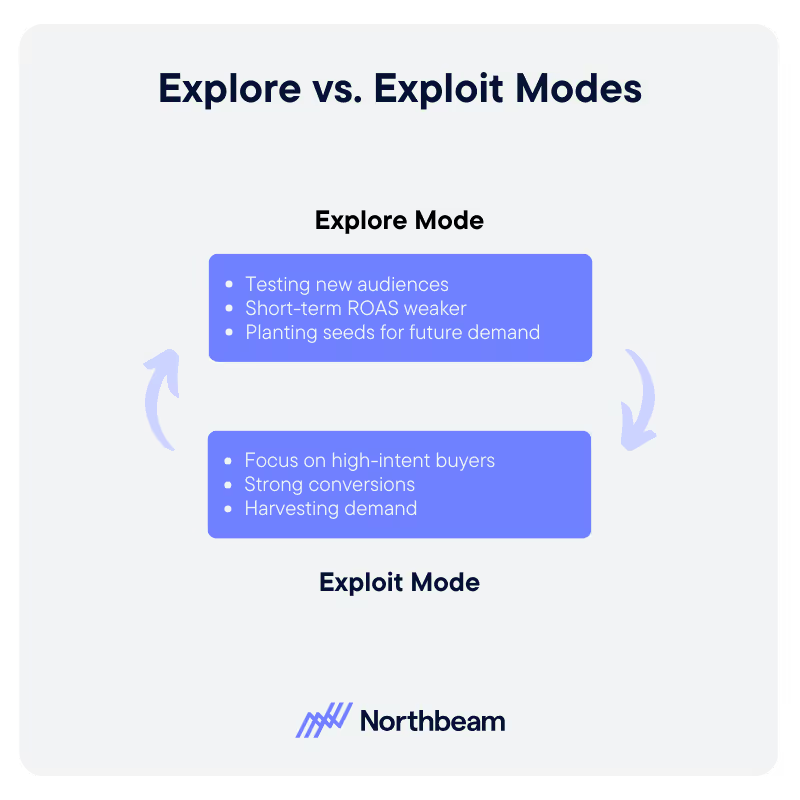
At its core, Meta’s delivery system is both a search and an exploit algorithm.
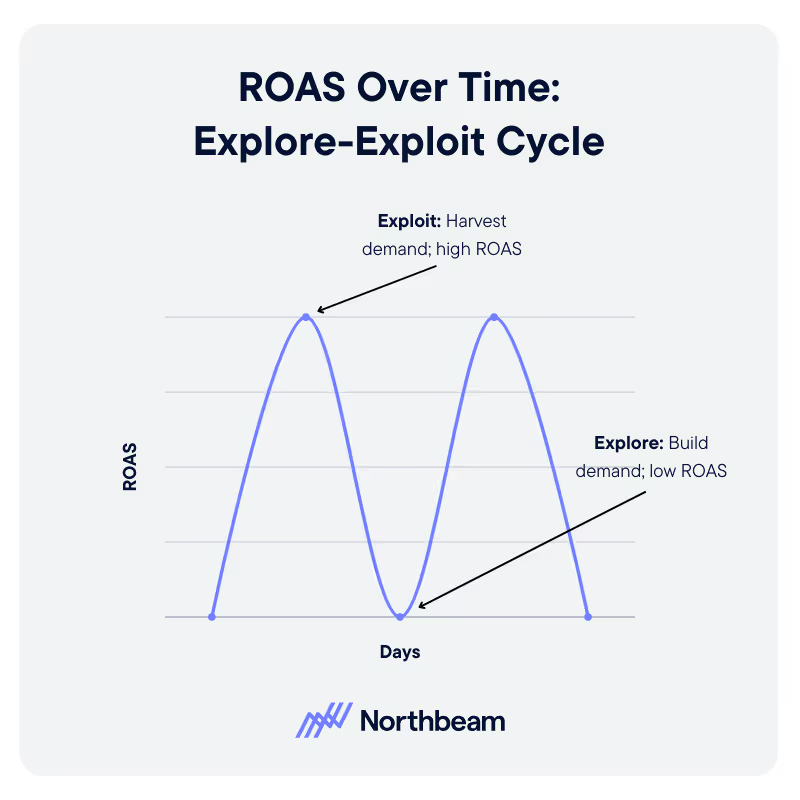
- Explore mode: The system invests budget to go out and find new people, many of whom aren’t yet ready to buy. During this phase, ROAS will usually look weaker because you’re building demand, not harvesting it.
- Exploit mode: Once Meta identifies high-intent buyers, the system leans hard into them. Performance spikes, conversion rates look fantastic, and you might feel like you’ve hit a new permanent level.
Then, just as suddenly, things dip again — because you’ve harvested that pocket of demand and the system goes back into Explore mode.
Why This Feels Like a Roller coaster
For advertisers who only look at day-to-day ROAS, these cycles can feel like chaos. I can’t tell you how many times a client has called me after three poor days in a row, convinced something’s broken. In reality, nothing’s wrong. The system is just back in Explore mode, doing the slower work of creating new demand.
The key is zooming out. Depending on your product’s average order value and sales cycle, it may take 7 to 14 days before the demand you planted during Explore mode actually shows up in conversions.
A Real-World Example
We worked with a home goods brand that had an average order value of around $1,000. Their account was shut down for a week due to a billing issue. During that pause, sales looked great — because they were still reaping demand planted by the ads that had run the week prior.
But the week after turning ads back on? Atrocious performance. Why? Because that pipeline had dried up during the pause. It took another full week of Explore spending before sales stabilized again.
That’s the Explore–Exploit cycle in action. If you’d pulled the plug after that “bad” week, you’d never give the algorithm the time it needs to rebuild demand.
How to Manage the Cycle Without Panic
- Measure in Weeks, Not Days
Look at 7–14 day trends instead of reacting to daily fluctuations. This smooths out the natural oscillations. - Know Your Customer Journey
If your product sells on first touch (like a $20 impulse buy), the cycle is shorter. If it’s a $1,000 purchase, the cycle is longer. Set expectations accordingly. - Don’t Overreact to Dips
When you hit a bad week after a great one, remind yourself: this is the system exploring, not failing. Pulling back budgets too soon just starves future growth. - Balance Demand Creation and Harvesting
Use prospecting campaigns to fuel Explore mode and retargeting to maximize Exploit mode. Both are necessary — ignore one and the other collapses.
The Bigger Picture
The Explore–Exploit cycle is baked into Meta’s DNA. It’s not a bug, it’s a feature. The system is constantly searching for new buyers and then doubling down on them once it knows who they are.
The advertisers who thrive are the ones who trust the process, ride out the valleys, and plan their strategies around the cycle instead of fighting it.
If you accept that volatility is normal, you stop chasing ghosts in your data and start focusing on the fundamentals: reach, frequency, creative, and consistent investment.
Closing Thoughts
Great weeks don’t last forever, and neither do bad ones. Meta’s algorithm is always oscillating between exploration and exploitation. The trick is not to panic when the pendulum swings.
If you can zoom out, understand the rhythm, and keep your budgets steady through the cycle, you’ll find that your account builds new baselines over time — and that’s how real, sustainable growth happens.




























































.avif)





















%25201.avif)


.avif)













.svg)
